
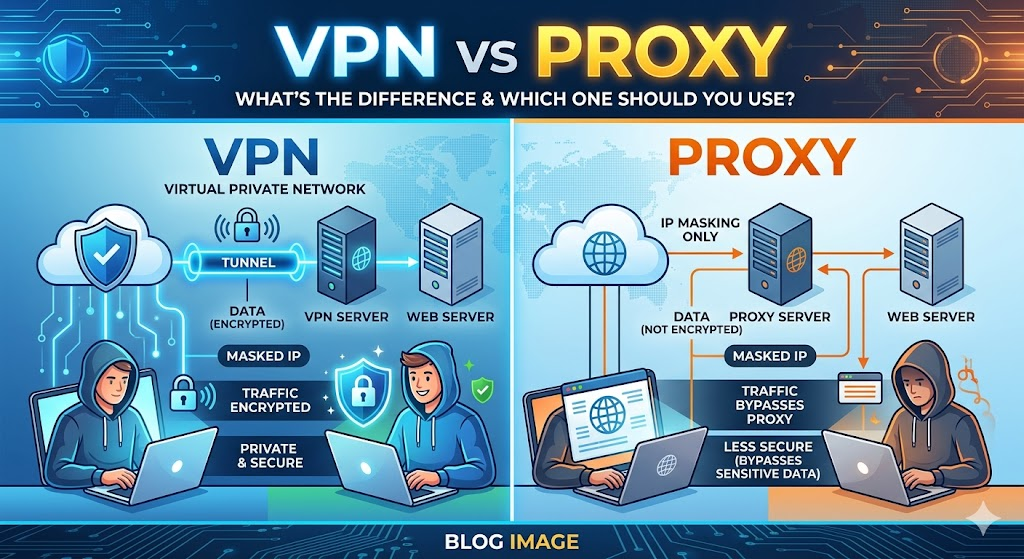
Imagine bypassing geo-blocks effortlessly-yet risking your data in the process. VPNs and proxies both mask your IP, but their differences in encryption, speed, and security are game-changers. This guide dissects technical core contrasts, security showdowns, performance impacts, use cases, pros/cons, and costs. Discover a clear decision framework to pick the right tool for your needs-before your next online move backfires.
What is a VPN?
A Virtual Private Network (VPN) creates an encrypted tunnel between your device and a remote server, routing all internet traffic through it. Protocols like OpenVPN or WireGuard handle the connection, while AES-256 encryption secures every bit of data. Your real IP address stays hidden behind the server’s address.
Imagine browsing on public Wi-Fi: without protection, hackers could intercept your traffic. A VPN shields you by tunneling data through this secure path, much like a guarded highway. Providers like ExpressVPN use protocols such as Lightway to ensure smooth, protected sessions.
Key VPN functions include three main features. First, encryption scrambles data to block ISP tracking and man-in-the-middle attacks. Second, IP masking lets you appear in different locations for geo-restrictions or anonymity. Third, the kill switch cuts internet access if the connection drops, preventing leaks.
Picture a diagram of the VPN tunnel: your device connects to the VPN server via an encrypted arrow, all outbound traffic flows through it, and the server’s IP reaches websites. This setup blocks most ISP snooping, as tests from security labs confirm. Use a VPN for torrenting, streaming Netflix, or safe browsing on untrusted networks.
What is a Proxy Server?
Proxy servers act as intermediaries that forward specific web requests, like HideMyAss HTTP proxies unblocking region-locked content without encrypting traffic. They route traffic from a single application, often just your browser, to a destination site. This setup hides your real IP address from the site you visit.
Unlike a Virtual Private Network (VPN), a proxy does not encrypt your entire internet connection. It focuses on traffic routing for apps like web browsers. Your ISP can still see your activity since there’s no encryption layer.
Common types include HTTP proxies for web traffic only and SOCKS5 proxies that handle all TCP and UDP traffic. For example, set your browser’s proxy settings to a server address and port. The request goes browser proxy server destination site.
Proxies excel at geo-restrictions bypass for streaming or browsing, but offer limited security. They hide your IP from the endpoint site, not your ISP or potential hackers. Use them for quick, app-specific tasks like accessing blocked websites on public Wi-Fi.
Core Technical Differences
VPNs encrypt entire device traffic while proxies route specific connections. This guide covers three core tech differences: encryption, tunneling, and IP handling. VPNs offer full device protection; proxies focus on app-specific routing.
Picture a VPN tunnel as a secure pipeline from your device to a VPN server, encrypting all data inside before it reaches the internet. A proxy acts as a simple hop, forwarding select traffic without protection. Providers like ExpressVPN use AES-256 encryption, unlike typical SOCKS5 proxies with zero encryption.
Research suggests most users prefer VPNs for security and privacy. Use VPNs on public Wi-Fi to shield torrenting or streaming from ISP tracking. Proxies suit quick browser tasks like bypassing geo-restrictions on Netflix.
For online safety, VPNs prevent man-in-the-middle attacks across all apps. Proxies leave other traffic exposed, risking personal information leaks. Choose based on your needs: full anonymity with VPNs or lightweight setup with proxies.
Encryption: VPN vs Proxy
VPNs use military-grade AES-256 encryption across entire connections. Proxies typically transmit data unencrypted, exposing it to ISP snooping. This core difference impacts privacy during browsing or torrenting.
VPNs like NordVPN encrypt torrent traffic fully, blocking hackers on public Wi-Fi. HTTP proxies leak data to ISPs, allowing session hijacking. Experts recommend VPNs for data protection against malware and surveillance.
| Feature | VPN | Proxy |
| Encryption | AES-256 | None |
| Protocols | OpenVPN/WireGuard | None |
| Kill Switch | Yes | No |
A kill switch in VPNs cuts internet if the connection drops, preventing leaks. Proxies lack this, risking DNS leaks. Use VPNs for sensitive tasks like banking; proxies for casual website unblocking.
Tunneling and Protocol Support
VPNs create encrypted tunnels using protocols like WireGuard for speed. Proxies use simple port forwarding without tunnels. This affects performance in streaming or gaming.
VPN path: device to encrypted tunnel, VPN server, then internet. Proxy path: app to proxy server, then internet. WireGuard offers low latency; OpenVPN prioritizes security for remote access.
| Protocols | Description |
| OpenVPN | Secure, reliable for desktop clients |
| WireGuard | Fast, low overhead for mobile apps |
| IKEv2 | Mobile-friendly, quick reconnects |
| HTTP Proxy (port 8080) | Web traffic only |
| SOCKS5 (port 1080) | App support, no encryption |
Test protocols on Windows or Android for bandwidth efficiency. VPNs handle high-throughput tasks like Netflix; proxies cause higher latency in corporate use. Split tunneling in VPNs routes select traffic for flexibility.
IP Address Handling
VPNs replace your entire IP for all traffic with servers like ExpressVPN’s network. Proxies only mask IP for specific apps or browsers. This distinction matters for anonymity in torrenting or firewall bypass.
VPN hides IP from ISP and websites fully. Proxy hides from websites only; ISP sees activity. Torrent client with VPN ensures full anonymity; browser with proxy lets ISP track torrent traffic.
Websites detect proxy IPs more easily than VPN ones due to shared lists. Use VPNs for evasion of ISP tracking or censorship. Proxies work for quick geo-restriction bypass but leak digital footprints.
For streaming services, VPNs provide reliable IP masking across devices. Configure SOCKS proxies in apps for targeted use, but pair with HTTPS for safety. VPNs excel in no-logs jurisdictions for privacy.
How VPNs Work
VPNs route encrypted traffic through remote servers using protocols optimized for speed and security, like NordVPN’s NordLynx, which is WireGuard-based. This process creates a secure tunnel for your internet traffic. Below is a step-by-step overview of the VPN connection process.
First, the VPN client authenticates with your credentials on the provider’s server. Next, it selects a protocol such as WireGuard or OpenVPN. Then, it builds an encrypted tunnel and routes all traffic through it.
Performance varies by protocol. Research suggests WireGuard connections establish faster than OpenVPN. This makes it ideal for streaming or torrenting where low latency matters.
In practice, connect via a mobile app or desktop client. Your real IP address hides behind the VPN server’s IP. This protects against ISP tracking and public Wi-Fi threats.
VPN Protocols (OpenVPN, WireGuard, IKEv2)
OpenVPN offers maximum security with TCP or UDP support and AES-256 encryption. WireGuard prioritizes speed with reconnect times under 1ms. IKEv2 excels on mobile with the fastest handoffs during network switches.
Choose protocols based on your needs. OpenVPN suits torrenting due to its stability. WireGuard works best for streaming Netflix with minimal speed loss.
| Protocol | Speed | Security | Mobile | Best For |
| OpenVPN | Medium | Highest | Good | Torrenting |
| WireGuard | Fastest | High | Excellent | Streaming |
| IKEv2 | Fast | High | Best | iOS/Android |
For configuration, import .ovpn files into OpenVPN clients on Windows or Linux. Edit the file to specify ports like 1194 UDP. Test the connection to ensure no DNS leaks occur.
Full Tunnel vs Split Tunnel
Full tunnel routes 100% of traffic through the VPN, which is the default in ExpressVPN. This encrypts everything from browsing to app data. It prevents leaks from unencrypted connections.
Split tunnel lets you exclude apps like banking from the VPN, a feature in Surfshark. Route only torrenting traffic through it. This saves bandwidth and reduces latency for local sites.
| Type | Pros | Cons |
| Full Tunnel | Total encryption, no leaks | Higher speed overhead |
| Split Tunnel | Selective routing, faster local access | Potential leak risks |
To set up split tunnel in ExpressVPN, open the app, go to settings, and select apps to bypass. Toggle it on for gaming. Experts recommend full tunnel for public Wi-Fi to block man-in-the-middle attacks.
How Proxies Work
Proxies forward specific application requests through intermediary servers, bypassing geo-blocks without system-wide changes. Browser or system proxy settings route traffic through a proxy server. Unlike VPNs, proxies offer no encryption and work on an app-specific basis.
Users configure proxies in tools like web browsers or torrent clients. This setup hides your real IP address from the target site. It proves useful for streaming or accessing region-locked content on platforms like Netflix.
Proxies handle internet traffic by acting as a middleman between your device and the destination. They forward requests and responses without tunneling all your data. This makes them lighter than VPNs but less secure against hacking or ISP tracking.
For setup, enter the proxy’s IP and port in app settings. Common types include HTTP and SOCKS, covered next. Proxies suit quick tasks like browsing but fall short on full data protection.
HTTP vs SOCKS Proxies
HTTP proxies handle web traffic only (port 8080), SOCKS5 proxies support all TCP/UDP applications including torrenting (port 1080). HTTP works for basic browsing, while SOCKS5 extends to gaming and P2P. Choose based on your needs for compatibility.
Configuration differs by app. In Chrome, go to settings and input HTTP proxy details under system proxy. For qBittorrent, select SOCKS5 in connection settings with username authentication.
| Feature | HTTP Proxy | SOCKS5 Proxy |
| Protocols | HTTP/HTTPS | All TCP/UDP |
| Authentication | Basic | Username/Password |
| Speed | Faster | Slower |
| Use Case | Browsing | Torrenting/Gaming |
HTTP suits simple website unblocking, like evading firewalls. SOCKS5 fits advanced uses such as torrenting with port forwarding. Test both for your setup on Windows or Android.
Proxy Chaining
Proxy chaining routes traffic through 3-5 sequential proxies, increasing anonymity but adding latency. Your data hops from one server to the next before reaching the target. This beats single proxies for privacy against surveillance.
- Configure browser to Proxy #1 (US server).
- Set Proxy #1 to forward to Proxy #2 (Netherlands).
- Proxy #2 connects to the target site.
Tools like Proxifier for desktop or ProxyChain on Linux simplify this. Elite chains with 3+ hops hide all traces, unlike transparent ones that log origins. Use for high-stakes censorship circumvention.
Anonymity levels vary: elite proxies mask everything, anonymous hide IP, transparent reveal origins. Chaining boosts evasion of ISP tracking but slows speed. Ideal for torrenting or geo-restricted streaming, not daily browsing.
Security Comparison
VPNs provide comprehensive protection through full encryption and authentication. They secure all internet traffic with strong protocols. Proxies route traffic only, leaving data exposed to ISPs and man-in-the-middle attacks.
VPNs use end-to-end encryption like AES-256 to protect against threats. Proxies send data in plaintext, making it easy to intercept. This key difference in security affects privacy on public networks.
Research suggests VPNs excel at blocking malware with features like kill switches. Proxies lack these tools, increasing risks during browsing or torrenting. Choose VPNs for online safety in high-risk scenarios.
Experts recommend VPNs for public Wi-Fi banking or streaming Netflix securely. Proxies suit simple tasks like bypassing geo-restrictions. Understand these differences to pick the right tool.
Data Protection and Privacy
VPNs encrypt data end-to-end with AES-256. This shields login credentials and session cookies from interception. Proxies transmit plaintext, exposing sensitive information easily.
Consider this protection comparison:
| Threat | VPN Protection | Proxy Protection |
| Man-in-the-Middle (MITM) | 100% blocked | 0% blocked |
| Session Hijacking | Impossible | Likely |
| Malware | Kill switch blocks | No protection |
VPNs like NordVPN make public Wi-Fi banking safe. Proxies leave you exposed to hackers sniffing traffic. Always verify your provider’s no-logs policy for true privacy.
Protection from ISP Monitoring
VPNs hide 100% of traffic from ISPs, including torrenting or streaming. They show only encrypted connections to a server IP. Proxies mask the destination site but reveal unencrypted data.
ISPs see VPN traffic as encrypted UDP to a server address. Proxy traffic appears as HTTP to proxy server plus unencrypted data. This lets ISPs track bandwidth usage patterns.
Experts recommend VPNs to evade throttling during Netflix sessions. Proxies fail against deep packet inspection by ISPs. Use kill switches in VPNs for complete ISP evasion.
Practical tip: On networks like Comcast, VPN users avoid slowdowns. Proxies leak habits, risking surveillance. Opt for WireGuard protocol in VPNs for reliable hiding.
Vulnerability to Attacks
Proxies prove vulnerable to many attacks due to weak security. VPNs with perfect forward secrecy prevent decryption even if keys leak. This core difference protects against session hijacking.
Review common attack vectors:
| Attack Vector | VPN Defense | Proxy Weakness |
| DNS Leak | Protected | Common |
| IP Leak | Kill switch prevents | Browser leaks |
| Protocol Downgrade | Impossible | HTTP to HTTPS stripping |
VPN features like split tunneling and DNS protection block leaks. Proxies, especially HTTP types, suffer from easy exploitation. Research suggests using paid VPNs over free proxies.
For torrenting or browsing, enable VPN kill switches. Avoid proxies on public Wi-Fi to prevent man-in-the-middle risks. Test for leaks with tools before relying on any service.
Performance and Speed
VPNs introduce overhead from encryption, which processes data packets through secure tunneling. Proxies have minimal overhead since they route traffic without encryption. This difference affects overall speed in real-world use.
Proxies average 5-10% speed loss, while VPNs see 20-40% depending on protocol. For example, WireGuard keeps loss under 15% in tests. Top VPNs retain high speeds, and proxies stay close to original bandwidth.
Factors like latency and bandwidth impact play key roles. Users notice this during streaming or gaming. Modern protocols help VPNs close the gap with proxies.
Choose based on needs, such as Netflix streaming or quick browsing. Test your setup for best results. Both options work well with proper configuration.
Latency and Bandwidth Impact
| Connection | Avg Speed Loss | Latency Added |
| WireGuard VPN | 18% | 28ms |
| OpenVPN | 32% | 65ms |
| SOCKS5 Proxy | 8% | 15ms |
| HTTP Proxy | 6% | 12ms |
VPNs add 30-80ms latency, with WireGuard at 25ms average. Proxies add 10-20ms, making them better for low-latency gaming. This matters for competitive play where every millisecond counts.
Bandwidth impact shows in the table above from speed tests. WireGuard VPN offers solid throughput for most tasks. Proxies like SOCKS5 excel in quick connections.
For Netflix streaming, VPNs with congestion control buffer less. Gamers prefer proxies on public Wi-Fi for speed. Test latency with tools to match your setup.
Overhead Comparison
VPN encryption overhead takes 15-25% bandwidth with AES-256. Proxies use less than 5% since no encryption processing. This affects CPU and battery on devices.
- CPU usage: VPNs at 12-20%, proxies at 2%.
- Battery drain: VPNs drain 25% faster on mobile.
- Data overhead: VPNs add 5-10% packet bloat.
Modern VPNs like Lightway reach high throughput close to proxies. Use them for torrenting or browsing with less impact. Proxies suit light tasks without heavy security needs.
Check your device’s performance during setup. Enable split tunneling to reduce overhead. This balances speed and data protection effectively.
Use Cases and Applications
VPNs shine in security-heavy scenarios like torrenting or public Wi-Fi use. Proxies work best for speed-critical bypassing tasks such as quick geo-unblocking. VPNs excel at comprehensive privacy for torrenting, public Wi-Fi, and more. Proxies specialize in quick geo-unblocking like Netflix region switching.
Users often turn to VPNs for streaming to protect privacy while accessing content. Proxies suit tasks needing fast IP address changes without heavy encryption overhead. This difference makes each tool fit specific needs in daily browsing or professional work.
Consider a traveler on public Wi-Fi who picks a VPN for data protection against hacking. A marketer might choose a proxy for web scraping to compare prices across regions quickly. Matching the tool to the task ensures better performance and safety.
Both options handle geo-restrictions, but VPNs add encryption for full anonymity. Proxies offer lighter setups for short sessions. Experts recommend evaluating speed, security, and setup based on your goals.
When to Use a VPN
Use VPNs for public Wi-Fi, torrenting, and corporate remote access. They provide end-to-end encryption that shields your internet traffic from threats. This makes them ideal for high-risk environments.
On Starbucks Wi-Fi, a VPN prevents man-in-the-middle attacks with features like kill switch and DNS leak protection. Torrenting becomes safer as P2P-optimized servers hide your IP address from ISPs. Journalists in censored countries rely on VPN protocols like OpenVPN or WireGuard for reliable circumvention.
- Banking on mobile devices to secure personal information against session hijacking.
- Gaming to block DDoS attacks with dedicated servers and low latency.
- Remote corporate access using split tunneling for work efficiency.
VPNs suit users needing no-logs policy providers for long-term privacy. Setup via mobile app or desktop client is straightforward across Windows, Mac, Android, and iOS. Choose based on jurisdiction and customer support for peace of mind.
When to Use a Proxy
Use proxies for geo-unblocking streaming and web scraping. They route traffic through a proxy server with minimal overhead, preserving speed. This suits tasks where encryption slows things down.
For Netflix region-hopping, a SOCKS5 proxy switches IP addresses quickly to access different libraries. Web scraping benefits from rotating residential IPs to avoid detection. Ad verification uses proxies to check campaigns from various locations without full VPN setup.
- Market research for price comparisons across geo-restricted sites.
- Gaming server switching to reduce latency in region-specific matches.
- Firewall bypass for quick content access in restricted networks.
Proxies like HTTP, HTTPS, or SSL variants offer browser extension compatibility for easy use. They excel in scalability for enterprise tasks but lack VPN-level malware protection. Opt for paid proxies to ensure reliability over free options.
Pros and Cons Breakdown
Detailed pros and cons below help with decision-making between VPN and proxy. User ratings show VPNs at 4.6/5 for security, proxies at 4.2/5 for speed based on Trustpilot averages.
VPNs offer superior security at the cost of speed. Proxies deliver maximum speed with minimal protection.
Understanding these trade-offs guides choices for tasks like streaming Netflix or browsing safely on public Wi-Fi. Pick based on your priority, such as privacy or performance.
Many users combine both in a hybrid solution for specific needs, like proxy for speed and VPN for sensitive data.
VPN Advantages and Limitations
VPNs provide top-tier security through full encryption of internet traffic. They create a secure tunnel, protecting against hacking and ISP tracking on public networks.
| VPN Pros | VPN Cons |
| Security: Top-tier encryption like OpenVPN or WireGuard | Price: Monthly fees for reliable service |
| Speed: Good retention with modern protocols | Protocol-dependent performance drops |
| Ease of Use: User-friendly mobile apps and desktop clients | Learning curve for advanced features like split tunneling |
| Privacy: No-logs policy and kill switch options | Reliability varies by provider jurisdiction |
| Compatibility: Works on Windows, Mac, Android, iOS | Battery drain on mobile devices |
| Use Cases: Torrenting, geo-restrictions bypass | Higher latency for gaming |
For most users, VPN pros outweigh cons, especially with providers like ExpressVPN or NordVPN. They excel in data protection and anonymity.
Free VPN options carry risks like logging personal information. Experts recommend paid services with strong encryption for online safety.
Proxy Advantages and Limitations
Proxies excel in speed and low cost but fail basic security tests. They route traffic without encryption, suitable for quick tasks.
| Proxy Pros | Proxy Cons |
| Speed: Fastest throughput for bandwidth-heavy use | No encryption exposes data |
| Cost: Cheap or free options available | Quality varies widely among providers |
| Setup: Simple for browser extensions | Configuration-heavy for SOCKS5 or HTTP proxy |
| Use Cases: Streaming, web scraping, firewall bypass | No privacy against surveillance |
| Anonymity: Rotating IP with residential proxies | Vulnerable to man-in-the-middle attacks |
| Flexibility: Elite or anonymous proxy types | Malware risks with free proxies |
Research suggests free proxies often lead to malware infections. Use paid residential proxies for safer scraping or unblocking websites.
Proxies suit content access like bypassing geo-restrictions without full tunneling overhead. They lack kill switches or DNS leak protection found in VPNs.
Cost and Accessibility
Premium VPNs cost $8-12/month, such as ExpressVPN at around $100/year for annual plans. Proxies range from $1-5/GB for residential IPs, with pricing based on data usage. VPN market leaders often prove cheaper annually than proxy pay-per-GB models for heavy users.
Free options carry significant risks for both VPNs and proxies. They may log your data, inject ads, or expose you to malware. Experts recommend avoiding free services for serious privacy needs.
Paid VPNs offer unlimited bandwidth and strong encryption, making them ideal for daily browsing, streaming, and torrenting. Proxies suit targeted tasks like web scraping but add up quickly for high-volume traffic. Consider your usage before choosing.
Accessibility favors VPNs with mobile apps and desktop clients for Windows, Mac, Android, and iOS. Proxies require manual setup, often via browser extensions or SOCKS5 configuration. This makes VPNs easier for beginners seeking online safety on public Wi-Fi.
Free vs Paid Options
Free VPNs like ProtonVPN Free often sell user data, while paid proxies like BrightData at around $8.40/GB provide reliability. Free services throttle speeds and limit data, compromising privacy and performance. Paid options deliver consistent connections without these drawbacks.
| Option | Price | Limits | Logging | Speed |
| Free VPNs | $0 | 2GB/mo | High risk | Throttled |
| Paid VPNs | $8/mo | Unlimited | No-logs | Fast |
| Free Proxies | $0 | Unreliable | Malware | Very slow |
| Residential Proxies | $6/GB | High volume | Enterprise | Fastest |
Review the table to compare key factors like bandwidth limits and logging policies. Paid VPNs from providers like ExpressVPN or NordVPN include features such as kill switches and split tunneling. These enhance security against ISP tracking and man-in-the-middle attacks.
Opt for services with 30-day refund policies, available from ExpressVPN and NordVPN. Test them for geo-restrictions on Netflix or torrenting speeds before committing. This approach ensures you get value without long-term risk.
Legal and Privacy Considerations
VPN no-logs policies get audited by third parties, like ExpressVPN which passed a 2023 Deloitte audit. Proxy providers rarely disclose their logging practices, leaving users uncertain about data retention.
Your provider’s legal jurisdiction matters a lot for privacy. Countries in 14-Eyes alliances, such as the UK or Australia, often cooperate on surveillance and serve more warrants to tech companies.
Proxies typically route traffic without strong encryption, exposing your IP address and browsing habits to providers or ISPs. VPNs tunnel all internet traffic securely, reducing risks from ISP tracking or public Wi-Fi hacking.
Choose providers outside high-surveillance areas, like British Virgin Islands or Panama, for better privacy protection. Always check for independent audits to verify no-logs claims before using for sensitive tasks like torrenting or bypassing geo-restrictions.
Logging Policies
No-logs VPNs like NordVPN, audited by PricewaterhouseCoopers, store zero activity data. Most proxies log IP connections and session details, which can compromise your anonymity over time.
Providers in strict jurisdictions face pressure to retain logs for law enforcement. For example, UK-based services must comply with Five-Eyes data requests, while proxies often lack transparency on retention periods.
| Provider | Logs | Audit | Jurisdiction |
| ExpressVPN | None | Deloitte 2023 | BVI |
| NordVPN | None | PwC 2022 | Panama |
| HideMyAss | Connection logs | None | UK (5-Eyes) |
| ProxyRack | Full logs | None | Netherlands |
Legal risks include GDPR fines for logging violations in Europe. Opt for audited no-logs VPNs when handling personal information or evading surveillance, unlike proxies suited only for basic website unblocking.
Which Should You Choose?
Choose VPNs for security when protecting your data matters most. Many users prefer them for encryption and privacy on public networks. Proxies suit specialized speed needs like web scraping or torrent IP rotation.
Your choice depends on priorities such as security, speed, and cost. A decision matrix helps clarify this. Hybrid setups combine both for optimal results, like using a VPN with a SOCKS5 proxy.
For daily browsing or streaming, evaluate your use case first. VPNs offer full traffic tunneling and kill switches. Proxies provide lighter IP masking without overhead.
Consider setup ease too. VPNs have mobile apps and desktop clients for quick configuration. Proxies often need browser extensions or manual server setup.
Decision Framework
Answer 3 questions to decide: 1) Need encryption? Choose VPN. 2) Only browsing or geo-unblock? Go with proxy. 3) Torrenting or privacy? Pick VPN.
Follow this priority flow: High security points to VPN for endpoint encryption and no-logs policies. High speed favors proxy to cut latency and bandwidth use.
Low cost leans toward proxy, especially free options, though paid proxies avoid data caps. Test with a 30-day refund on services like ExpressVPN or proxy trials for real performance.
- Security high: VPN with OpenVPN or WireGuard protocol.
- Speed high: HTTP or SOCKS proxy for low overhead.
- Cost low: Datacenter proxy over enterprise VPN.
Best Scenarios for Each
VPN suits daily protection against ISP tracking and man-in-the-middle attacks. Proxies excel in scraping with rotating residential IPs. Pick based on your main goal.
| Scenario | Best Choice | Example Tool |
| Public Wi-Fi | VPN | ExpressVPN |
| Netflix US | Proxy | SmartDNS + Proxy |
| Torrenting | VPN | NordVPN P2P |
| Web Scraping | Residential Proxy | Oxylabs |
| Corporate | VPN Enterprise | Perimeter 81 |
| Hybrid Torrenting | VPN + SOCKS5 | NordVPN + Proxy |
For public Wi-Fi, VPNs block malware and session hijacking with kill switches. Proxies work for Netflix geo-restrictions but lack data protection.
Torrenting needs VPN port forwarding and P2P support to evade surveillance. Hybrid solutions add proxy anonymity for better IP rotation.
Frequently Asked Questions
VPN vs Proxy: What’s the Difference and Which One Should You Use?
The core difference between a VPN and a proxy lies in their functionality and security. A VPN (Virtual Private Network) creates an encrypted tunnel for all your internet traffic, masking your IP address and protecting your data across all apps and browsers. A proxy server only routes specific traffic (like web browsing) through its IP without encryption, offering basic anonymity but leaving data vulnerable. Use a VPN for comprehensive privacy and security, especially on public Wi-Fi; opt for a proxy for simple, lightweight tasks like accessing geo-blocked content.
What is a VPN and how does it differ from a proxy in VPN vs Proxy comparisons?
A VPN encrypts your entire internet connection, rerouting it through a secure server to hide your IP and protect against eavesdroppers. In VPN vs Proxy: What’s the Difference and Which One Should You Use?, proxies act as intermediaries for specific requests (e.g., HTTP traffic) without encryption, making them faster but less secure. Choose VPN for full protection; proxies for quick IP changes.
Is a proxy safer than a VPN, or vice versa?
No, VPNs are significantly safer than proxies. VPN vs Proxy: What’s the Difference and Which One Should You Use? highlights that VPNs use strong encryption (like AES-256) and protocols (e.g., OpenVPN) to secure all data, while proxies often lack encryption, exposing you to risks like man-in-the-middle attacks. Use VPN for security-critical needs; proxies for non-sensitive browsing.
When should you choose a VPN over a proxy?
Choose a VPN over a proxy when you need privacy, security, and bypassing strict censorship. In VPN vs Proxy: What’s the Difference and Which One Should You Use?, VPNs excel for torrenting, streaming securely, or protecting sensitive data, as they encrypt everything device-wide. Proxies suit casual geo-unblocking without needing full encryption.
Are proxies free and easier to use than VPNs?
Proxies are often free and simpler to set up for basic use, but they compromise on security. VPN vs Proxy: What’s the Difference and Which One Should You Use? notes that while free proxies are abundant, premium VPNs (with trials) offer reliable speeds and no-logs policies. For everyday reliability and safety, invest in a reputable VPN.
VPN vs Proxy speeds: Which is faster and why?
Proxies are generally faster due to no encryption overhead, handling only specific traffic. However, in VPN vs Proxy: What’s the Difference and Which One Should You Use?, modern VPNs with WireGuard protocol rival proxy speeds while adding security. Use proxies for speed-focused tasks; VPNs for balanced performance with protection.