 dev
Choosing a hosting plan is one of the first technical decisions involved in launching a website. For many beginners, shared hosting is an affordable way to get started. It offers a simple setup process and usually includes the basic resources needed for a small website.
However, as a website grows, its hosting requirements may change. More visitors, additional applications, larger databases, and demanding plugins can place greater pressure on the server.
At this stage, website owners often consider moving to VPS hosting.
But does every growing website need a VPS? Not necessarily.
Understanding the differences between shared hosting and VPS hosting can help you decide when an upgrade makes sense and whether the additional cost is justified.
Understanding Shared Hosting
Shared hosting is a hosting arrangement where multiple websites operate on the same physical server.
These websites share server resources such as processing capacity, memory, and storage infrastructure.
The hosting provider manages much of the underlying environment, making this option convenient for beginners and website owners who do not want to handle server administration.
Shared hosting is commonly used for:
- Personal blogs.
- Small business websites.
- Portfolio websites.
- Informational websites.
- New content publishing projects.
Why Do Beginners Choose Shared Hosting?
The main advantage is affordability.
Since server resources are shared among multiple customers, hosting providers can offer relatively low subscription prices.
Shared hosting plans also commonly include control panels, email services, database management, SSL support, and website installation tools.
However, the available resources and configuration options may be limited.
Understanding VPS Hosting
VPS stands for Virtual Private Server.
VPS hosting uses virtualisation technology to divide a physical server into separate virtual environments.
Each VPS operates with its own allocated resources and operating system environment, depending on the provider’s configuration.
Unlike traditional shared hosting, VPS customers usually receive greater control over their server settings.
VPS hosting is suitable for:
- Growing business websites.
- Content heavy publishing platforms.
- Web applications.
- Development environments.
- Custom software projects.
- Websites requiring specific server configurations.
A VPS can offer dedicated resource allocations, although actual performance and isolation depend on the provider and infrastructure.
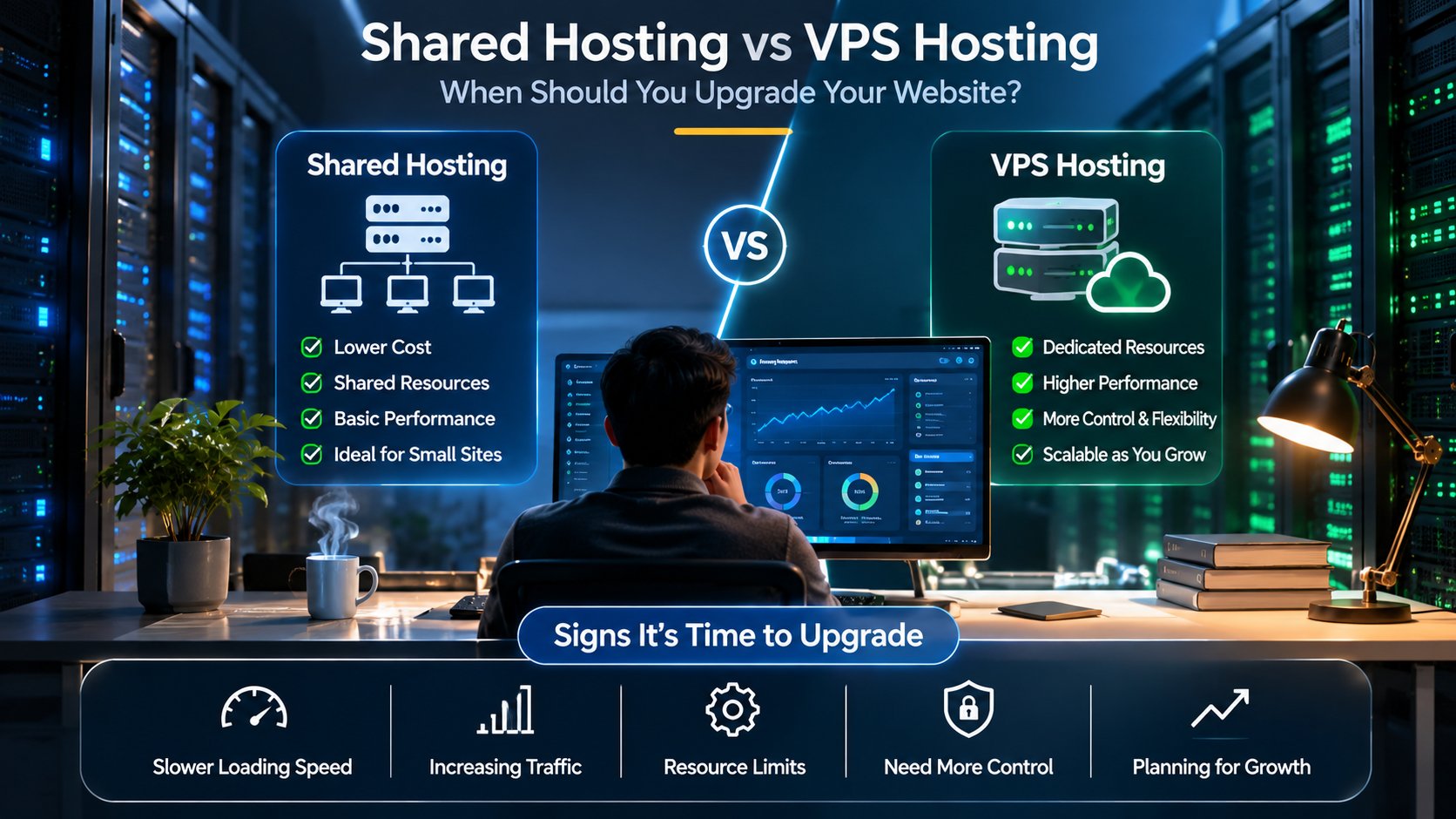
Shared Hosting vs VPS Hosting: Main Differences
| Feature | Shared Hosting | VPS Hosting |
|---|---|---|
| Server environment | Shared among multiple websites | Separate virtual environment |
| Cost | Generally lower | Generally higher |
| Resource control | Limited | Greater control |
| Server configuration | Mostly managed by provider | More configurable |
| Technical knowledge | Suitable for beginners | May require administration skills |
| Scalability | Depends on available plans | Often offers flexible upgrades |
| Root access | Usually unavailable | Often available |
| Maintenance | Provider manages most server operations | Responsibility varies by plan |
The correct choice depends on the technical needs of your website rather than the popularity of a particular hosting type.
1. Your Website Is Experiencing Frequent Slowdowns
A slow website can affect user experience and make important pages difficult to access.
If your website frequently becomes slow during normal usage, hosting resources may be one possible cause.
Shared hosting plans often have defined resource limits. If your website requires more processing capacity or memory than the plan provides, performance may become inconsistent.
A VPS may provide more predictable resource allocation.
However, do not upgrade immediately without investigating the problem.
Slow websites can also result from:
- Unoptimised images.
- Excessive plugins.
- Poorly configured databases.
- Inefficient application code.
- Caching problems.
- External scripts.
- High network latency.
Check server resource usage and website performance before deciding whether a hosting upgrade is necessary.
2. Your Website Traffic Is Increasing
A website that receives a few hundred visits each month may have very different requirements from one that receives thousands of daily visitors.
Increasing traffic can place additional pressure on the server, especially when visitors interact with databases, search functions, login systems, or dynamic pages.
A VPS may be worth considering when your current hosting plan regularly reaches its resource limits.
However, traffic volume alone does not determine hosting requirements. A lightweight static website may handle significant traffic with fewer resources than a complex online store.
Consider the type of application, page complexity, caching strategy, and visitor behaviour before selecting a plan.
3. You Need More Server Configuration Control
Shared hosting providers generally restrict access to certain server settings.
This makes the environment easier to manage but can create limitations for developers working with custom applications.
A VPS can provide more flexibility.
Depending on the provider and operating system, users may be able to configure:
- Web server software.
- PHP versions.
- Database services.
- Scheduled tasks.
- Application dependencies.
- Firewall rules.
- Background processes.
This flexibility is particularly useful for developers who need a specific software environment.
However, greater control also means greater responsibility for security, updates, and maintenance.
4. Your Application Requires Additional Software
Some applications require specific server configurations or background services that may not be available on shared hosting.
For example, a developer may need custom runtime versions, specialised libraries, scheduled processes, or particular database settings.
A VPS can provide a more suitable environment for these requirements.
Before upgrading, check the application’s technical documentation and hosting compatibility requirements.
Also confirm whether the VPS provider supports the operating system and resources your application needs.
5. You Need Better Resource Isolation
On shared hosting, multiple websites operate within the same physical server environment.
Although hosting providers apply resource controls and security measures, the overall environment is still shared.
VPS hosting creates separate virtual server environments with allocated resources.
This can provide greater isolation and control compared with traditional shared hosting.
However, VPS hosting does not automatically guarantee security. Incorrect server configuration, outdated software, weak credentials, and exposed services can still create vulnerabilities.
6. You Want to Host Multiple Projects
Developers and agencies sometimes manage several websites or applications.
A VPS can provide a flexible environment for hosting multiple projects, provided the server has enough resources and the applications are configured correctly.
For example, a developer may use a VPS to host a business website, staging environment, and internal application.
Before placing multiple projects on one server, consider:
- Memory requirements.
- Processing capacity.
- Storage availability.
- Database workload.
- Security separation.
- Backup requirements.
- Expected traffic.
Avoid placing unrelated high risk applications together without considering isolation and access controls.
What Are the Limitations of VPS Hosting?
Although VPS hosting offers greater flexibility, it is not automatically the best choice for everyone.
Server Management
An unmanaged VPS may require knowledge of Linux administration, command line tools, web server configuration, and security maintenance.
Security Responsibility
Users may need to configure firewalls, update software, manage access permissions, and monitor server activity.
Additional Costs
The basic server price may not include managed support, backup services, monitoring, control panels, or advanced security features.
Resource Planning
Choosing insufficient memory or processing capacity can create performance problems even after upgrading from shared hosting.
Managed VPS vs Unmanaged VPS
VPS hosting is commonly offered in managed and unmanaged forms.
A managed VPS includes additional support from the hosting provider. Depending on the plan, the provider may help with server updates, monitoring, security configuration, and technical maintenance.
An unmanaged VPS gives the customer more responsibility for server administration.
This option can suit experienced developers who prefer direct control over their infrastructure.
Before purchasing, check exactly which management services are included. Providers use different definitions of managed hosting.
A Practical Upgrade Checklist
Before moving from shared hosting to VPS hosting, review these points:
- Check whether your current hosting plan regularly reaches its resource limits.
- Identify whether website slowdowns are caused by hosting or application issues.
- Review your expected traffic growth.
- Confirm whether your application requires custom server settings.
- Estimate the memory, CPU, and storage requirements.
- Compare managed and unmanaged VPS plans.
- Review backup, security, and support options.
- Plan the migration and test the website before changing DNS settings.
A hosting upgrade should solve a real problem rather than simply increase monthly expenses.
Conclusion
Shared hosting and VPS hosting serve different website requirements.
Shared hosting is often suitable for beginners, personal websites, and smaller projects that need an affordable and straightforward environment.
VPS hosting becomes attractive when a website requires greater resource allocation, server configuration flexibility, application compatibility, or more control over its hosting environment.
Before upgrading, review website performance, resource usage, traffic patterns, and technical requirements.
The best hosting solution is the one that supports your current workload while providing enough room for future growth.
Frequently Asked Questions
1. Is VPS hosting better than shared hosting?
VPS hosting provides more server control and separate virtual resources, while shared hosting is generally more affordable and easier to manage. The better choice depends on your website requirements.
2. When should I upgrade from shared hosting to VPS?
Consider upgrading when your website regularly reaches resource limits, requires custom server configurations, or needs a hosting environment better suited to its growing workload.
3. Is VPS hosting suitable for WordPress?
Yes. VPS hosting can support WordPress websites, especially those requiring additional resources or server configuration flexibility.
4. Does VPS hosting improve website speed?
It can improve performance when the existing hosting environment is the bottleneck. However, application optimisation, caching, database performance, and network quality also affect speed.
5. Is VPS hosting difficult for beginners?
An unmanaged VPS can be challenging without server administration knowledge. Managed VPS plans may be more suitable for beginners who need additional technical support.
6. Can I host multiple websites on one VPS?
Yes, provided the server has sufficient resources and each website is configured and secured properly.
7. What is the difference between managed and unmanaged VPS hosting?
Managed VPS hosting includes provider assistance with selected server management activities. Unmanaged VPS hosting gives customers more responsibility for configuration, updates, and maintenance.
8. Does VPS hosting provide complete security?
No. VPS hosting offers an isolated virtual environment, but security still depends on server configuration, software updates, access controls, and monitoring.