
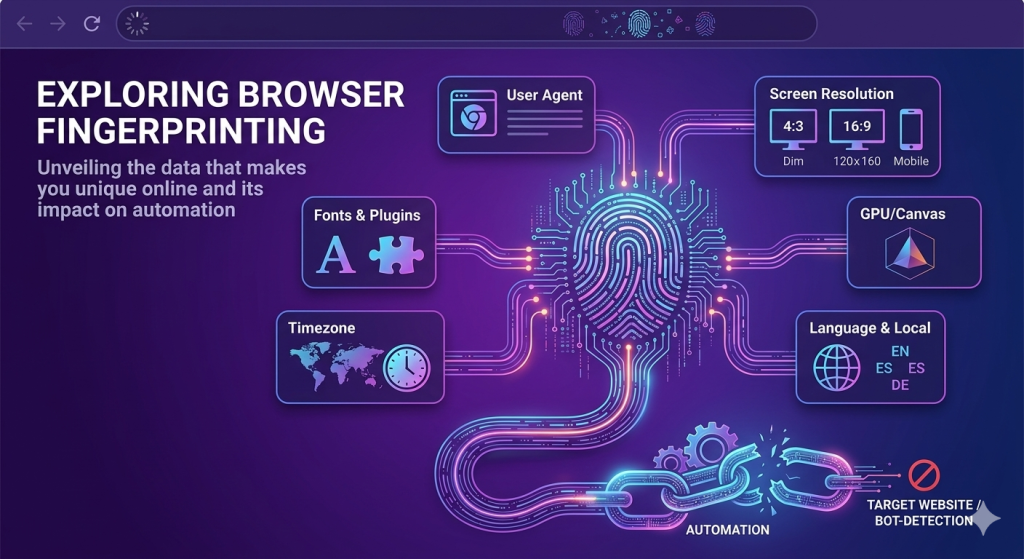
The internet has changed dramatically over the last few years. Websites are no longer depending only on cookies or IP addresses to identify visitors. Instead, they now use advanced browser fingerprinting techniques to recognize users with incredible precision.
For businesses and developers running automation systems, this shift has become a serious challenge. You can rotate proxies, clear cookies, and switch accounts, but if your browser fingerprint stays the same, detection systems can still identify you instantly.
This is why many automation setups fail even when the proxy infrastructure looks perfect.
Understanding how browser fingerprinting works is now essential for anyone involved in scraping, ad verification, multi-account management, cybersecurity research, or automated browsing.
The Shift From Cookies to Browser Fingerprints
Traditional tracking methods relied heavily on cookies and stored identifiers. Websites would save information inside the browser and use it to recognize returning visitors.
The problem for websites was simple:
Users could delete cookies easily.
Privacy regulations like GDPR and CCPA also limited how websites could collect and store tracking data. As a result, companies started looking for more persistent identification methods.
That is where browser fingerprinting became important.
Instead of storing information on the user’s device, fingerprinting collects details already exposed by the browser and operating system. These details are combined to create a highly unique digital profile.
When someone opens a website, the browser automatically reveals information such as:
- Browser type and version
- Operating system
- Screen resolution
- Installed fonts
- Time zone
- Device language
- GPU information
- Audio processing behavior
- Hardware specifications
Individually, these values seem harmless. Together, they create a unique identity that can often distinguish one device from millions of others.
Unlike cookies, fingerprints are difficult to remove because they are based on how the device naturally behaves.
What Makes a Browser Fingerprint Unique?
Browser fingerprints are built from multiple layers of information. Detection systems compare these signals to determine whether a visitor looks like a real user or an automated system.
Here are the most important fingerprinting methods used today.
1. Browser and System Information
Every browser exposes basic system details automatically.
This includes:
- User-Agent strings
- Operating system data
- CPU core count
- Device memory
- Installed browser plugins
- Screen dimensions
Websites use these values to evaluate whether the environment appears realistic.
For example, if a browser claims to be running on Windows but exposes Linux graphics drivers, the inconsistency becomes suspicious immediately.
Automation frameworks often create these mismatched environments accidentally.
2. Canvas Fingerprinting
Canvas fingerprinting uses HTML5 rendering behavior to identify devices.
A website silently asks the browser to draw hidden graphics or text. The rendered output is then analyzed pixel by pixel.
Tiny differences in hardware, graphics drivers, fonts, and rendering engines create subtle variations in the final image.
These differences are invisible to humans but highly useful for tracking systems.
Even two computers running the same browser version can generate different canvas fingerprints.
3. WebGL Fingerprinting
WebGL gives websites access to graphics rendering information.
This allows platforms to inspect details such as:
- GPU vendor
- Graphics renderer
- Supported rendering extensions
- Shader precision
Real devices produce natural GPU signatures, while automation systems often reveal virtual machines or software-rendered graphics.
This is one of the fastest ways anti-bot systems detect suspicious browsers.
4. Audio Fingerprinting
Modern browsers also expose audio processing behavior through the Web Audio API.
Websites can generate silent audio signals and measure how the device processes them internally.
Small hardware-level differences create unique audio signatures that help strengthen fingerprint accuracy.
5. Behavioral Fingerprinting
Fingerprinting is no longer limited to technical device data.
Websites now monitor how users behave.
This includes:
- Mouse movement patterns
- Typing speed
- Scrolling behavior
- Click timing
- Navigation flow
- Idle periods
Human behavior is naturally inconsistent.
Bots, however, often move too perfectly or operate with unrealistic speed and precision.
These behavioral patterns make automation easier to detect even when technical fingerprints appear clean.
Why Browser Fingerprinting Breaks Automation
Many automation systems focus heavily on IP rotation while ignoring browser identity consistency.
This creates a major problem.
Imagine running a scraper that rotates residential proxies across multiple countries. Each request uses a different IP address, but the browser fingerprint remains identical.
From the website’s perspective, the same device suddenly appears in Germany, Canada, Japan, and Brazil within minutes.
That is not normal human behavior.
Even if the proxies are legitimate, the fingerprint mismatch exposes the automation instantly.
This is why browser fingerprinting has become one of the biggest obstacles for modern automation workflows.
Common Signs That Reveal Automated Browsers
Anti-bot systems look for patterns that real users rarely produce.
Some of the most common detection signals include:
Headless Browser Indicators
Automation frameworks like Selenium and Puppeteer often run browsers in headless mode.
Historically, headless browsers exposed obvious automation flags such as:
navigator.webdriver = true- Missing plugins
- Empty MIME types
- Broken permission handling
Although newer tools hide many of these signals, detection systems continue evolving.
Inconsistent Browser Profiles
A realistic browsing environment requires internal consistency.
For example:
- German IP address
- German timezone
- German language settings
- European keyboard layout
When these details conflict, websites immediately recognize suspicious activity.
Reused Fingerprints
Using the same fingerprint repeatedly across multiple sessions or accounts creates clustering patterns.
Websites can link accounts together even if different proxies are used.
This is especially problematic for large-scale scraping and account management systems.
Unrealistic User Behavior
Bots often browse too efficiently.
They:
- Open pages instantly
- Click too quickly
- Scroll perfectly
- Never hesitate
- Operate continuously without breaks
Human browsing behavior is naturally irregular, and modern anti-bot systems model this heavily.
Why Proxies Still Matter
Browser fingerprinting is powerful, but IP reputation still plays a major role in detection systems.
Most websites quickly flag:
- Data center IPs
- Abnormally high request volumes
- Suspicious ASN ranges
- Known proxy infrastructure
This is why residential and mobile proxies remain essential for serious automation projects.
High-quality residential proxies help automation traffic blend into normal internet activity by routing requests through real ISP networks.
When browser fingerprint consistency is combined with reliable proxy rotation, automation becomes significantly more stable and difficult to detect.
Best Practices for Safer Automation
While no setup is permanently invisible, a few practices can dramatically reduce detection rates.
Maintain Consistent Identities
Ensure your browser profile matches your IP location.
Your:
- Timezone
- Language
- Browser version
- Device configuration
should align naturally with the proxy geography.
Use Realistic Browser Profiles
Avoid synthetic or obviously virtualized environments.
Use believable:
- Screen resolutions
- GPU configurations
- Fonts
- Hardware specifications
The closer the setup resembles a real device, the lower the detection risk.
Avoid Robotic Behavior
Automation should imitate natural browsing patterns.
Add:
- Randomized delays
- Human-like scrolling
- Natural mouse movement
- Session pauses
Perfect behavior is often the easiest behavior to detect.
Monitor Detection Signals
Pay attention to indicators such as:
- Captchas
- 403 errors
- 429 rate limits
- Sudden login failures
- Account verification requests
These usually indicate fingerprint inconsistencies or poor session quality.
Final Thoughts
Browser fingerprinting has completely transformed how websites identify users online.
The internet is no longer relying only on cookies or IP addresses. Detection systems now analyze browser behavior, hardware characteristics, network signals, and interaction patterns together to determine whether a visitor is legitimate.
For automation professionals, this means successful scraping or browser automation is no longer just about writing scripts.
It is about creating believable digital identities.
In today’s environment, realism matters more than speed.